Ringtones for Android™
- 4.2
- Rating
- 100.00M
- Installs
- Free
- Price

 Analysis by App-foxy
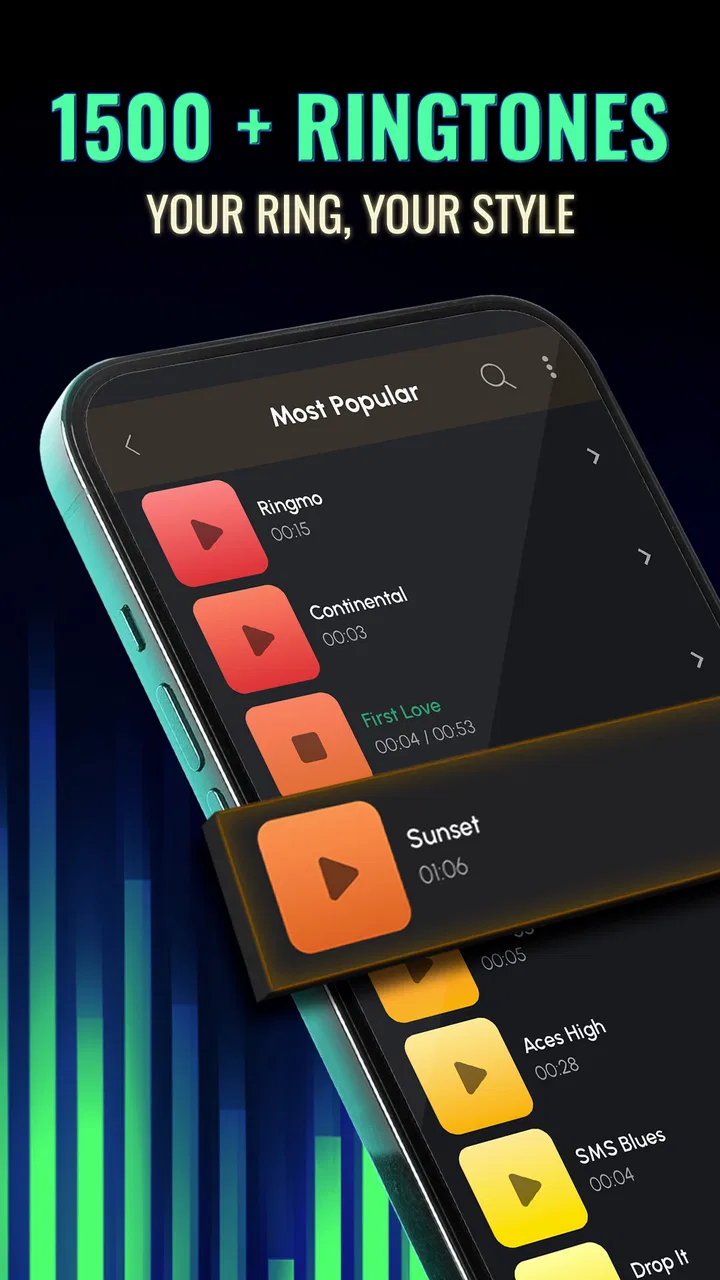
Finding a ringtone that feels personal sounds simple until I actually try to do it. The usual options are often too limited, buried in settings, or mixed with audio I would never use. Ringtones for Android™ takes a more direct approach by putting ringtone-focused audio and wallpapers together in one free music and audio app. I tested it as the kind of tool I would open when my phone needs a small refresh rather than a complete customization project.
My impression is that it works best as a quick discovery app. I can browse sounds, listen before choosing, and move from hearing something I like to using it as part of my phone’s identity. The wallpaper side makes the experience feel more complete, although the strongest reason to install it is still the ringtone collection. If you want a simple way to make calls feel less ordinary, it is worth considering. If you want a highly precise audio editor or a carefully organized music library, you may find it less satisfying.
From a boring default to a more personal phone
The starting condition is familiar: I hear the same default alert every day, or I keep missing calls because the sound blends into the background. Rather than searching through individual audio files, I can use this app as a dedicated place to explore ringtone-style sounds. That focus saves time, especially when I do not already have a particular track or sound in mind.
You May Also Like

 AccuWeather: Weather Radar
AccuWeather Review: A Quick, Clear Forecast for Everyday Decisions
For everyday plans, the best forecast is the one you can understand quickly. AccuWeather makes rain timing, radar, and local conditions easy to act on, with a few trade-offs.

 Hill Climb Racing
Why Hill Climb Racing Still Turns Crashes Into One More Run
A tiny car, a bumpy hill and one more upgrade: Hill Climb Racing keeps resurfacing because its simple chaos makes every near-miss feel personal.

 AliExpress - Shopping App
AliExpress Makes Global Shopping Feel Personal, but Shoppers Bear the Risk
AliExpress turns a global marketplace into a pocket-sized discovery engine. Its reach is useful, its shopping loop compelling, and its trade-offs easy to miss.

 Lords Mobile: Kingdom Wars
Lords Mobile Is a Kingdom-Building Routine, Not a Quick Match
A case-by-case verdict on the building, battles, device demands, and social commitments that make Lords Mobile rewarding for some players and exhausting for others.

 PDF Scanner app - TapScanner
TapScanner Makes Paperwork Easier to Capture, Check, and Share
TapScanner makes scanning with a phone feel less like a rescue operation and more like a dependable step in getting work done. Its capture tools are useful, though not flawless.

 Block Blast!
 Shows How Much a Puzzle Game Can Leave Out
A quiet grid game shows why puzzle players increasingly value instant clarity, repeatable skill and low-pressure play—and where the genre still needs to catch up.
More From Our News Desk
View All News


Ringtones for Android™ is developed by Peaksel Ringtones Apps and sits in the Music & Audio category. It is free to install, which makes experimenting easy. The app is intended for a Teen audience, and its current version is 15.12.3. It runs on Android 7.0 or later, so it is available to people using a wide range of Android phones rather than only recent models.
The scale of its audience is also notable: it has passed 100 million installs, with an average rating of 4.2 from roughly 619 thousand ratings. That does not automatically make every sound a good match for me, but it suggests the app has remained useful to a large number of Android users. I treat that popularity as a reason to try it, not as a guarantee that the first sound I hear will be the right one.
What I do before browsing
Before opening the app, I decide what problem I am trying to solve. A ringtone for incoming calls needs to be noticeable over conversation, traffic, or a busy room. A notification sound has a different job: it should be short enough not to become irritating when messages arrive throughout the day. A wallpaper is more visual and personal, but it does not solve the problem of recognizing a call.
That small distinction improves the experience. If I browse without a purpose, I can spend too long skipping through sounds that are amusing for a few seconds but tiring after repeated use. When I know whether I want something energetic, calm, funny, dramatic, or simply clear, the selection process becomes much more practical.
I also think about whether I want one sound for everything or different sounds for different situations. A single ringtone is easier to manage, while separate choices can help me identify calls without looking at the screen. The app is more useful when I approach it as a small workflow: choose the role, preview the sound, apply it, then live with it for a day before deciding whether it stays.
How the ringtone workflow feels in practice
I find the ringtone workflow most useful when I treat it as a small decision rather than a browsing session: identify what the sound needs to do, compare a few options, then check the result in the phone’s normal settings. That approach helps me avoid picking something that is fun for a preview but distracting all day. The next section looks at where that convenience holds up and where I would reach for a different tool.
Step one: browse with a specific purpose
My first step is to explore the available ringtone material instead of immediately selecting the first item that catches my attention. The app’s dedicated focus gives browsing a different feel from opening a general file manager. I am looking for sounds that are already presented as phone-ready choices, not trying to turn an unrelated audio clip into a usable alert.
This is particularly helpful for someone who has no collection of personal audio files. A general music app may help me discover songs, but it is not necessarily designed around the question, “Would this work when my phone rings?” Ringtones for Android™ keeps that question at the center. I can judge each option by its opening, clarity, and overall mood rather than by the full listening experience of a song.
One useful habit is to reject sounds that are impressive only during a short preview. A ringtone can be entertaining once and annoying after a week. I listen for whether the beginning is recognizable, whether the volume feels balanced, and whether the sound would be awkward in a quiet public place. This is a personal test rather than a feature, but it makes the app’s large choice feel more manageable.
Step two: preview before committing
Previewing is the most important part of the process for me. A name or thumbnail cannot tell me whether a sound will cut through background noise. I listen several times and imagine hearing it from another room, inside a bag, or while I am already focused on something else.
I also pay attention to repetition. Some sounds are immediately recognizable but become distracting when they repeat. Others start gently and may be too easy to miss. The best everyday choice is usually somewhere between those extremes: distinctive enough to identify, but not so aggressive that every call feels like an interruption.
This is where the app can be more convenient than collecting audio manually. With personal files, I might need to locate the right track, check its length, and work out whether it begins at a useful point. A ringtone-focused catalog reduces that preparation. The trade-off is that I am choosing from the app’s style and organization rather than shaping every second myself.
Step three: match the sound to the situation
For a normal phone, I prefer a sound with a clear opening and a rhythm that remains easy to recognize. For a work setting, I would avoid anything overly comic or dramatic, even if it is fun in private. For a teenager’s phone, the Teen content rating is worth keeping in mind when deciding whether the overall style feels appropriate for the intended user.
A realistic example is a person who keeps missing calls while commuting. I would open the app at home, choose several brighter sounds, preview them at a comfortable volume, and select one that remains distinct without being harsh. After applying it, I would test the phone from a short distance instead of assuming the preview tells the whole story. That final check matters because the phone speaker, case, and surrounding noise all affect the result.
Another scenario is sharing a phone with family members. A personalized ringtone can make it easier to know who is calling, but only if the chosen sound is reserved for that person or purpose. I would avoid changing every alert at once. Starting with the main ringtone gives me a clear result and makes it easier to identify whether the change actually helps.
Step four: use the wallpaper side carefully
The wallpaper collection adds a visual handoff to the audio workflow. After choosing a sound, I can consider whether I also want the phone’s appearance to match the new mood. This can make customization feel more cohesive, but I do not see it as essential. A good ringtone remains useful even if I keep my existing wallpaper.
I am cautious about changing the wallpaper simply because it is available. A busy image may make app icons harder to read, while a very bright image can feel tiring over time. I prefer to choose a background that supports daily use rather than one that looks striking only during the first few minutes. The app works better for me when I treat wallpapers as an optional finishing touch, not as a requirement.
Step five: complete the handoff to the phone
The crucial handoff is moving from discovery inside the app to the phone’s everyday behavior. I expect the selected sound to become useful outside the app, when calls arrive and I am not actively looking at the screen. That means I do not consider the task complete until I have checked the phone’s ringtone settings and heard an actual incoming call.
On Android, system behavior can vary between devices and manufacturers. A sound may be selected successfully but still be affected by silent mode, vibration settings, volume levels, or a separate profile. I therefore check the phone’s sound mode after making a choice. This is not a criticism of the app alone; it is a reminder that customization tools hand control back to the operating system.
I also test the result with headphones removed and the phone placed where I normally keep it. A sound that seems loud enough while holding the device may be less effective from a desk or inside a jacket. This simple test is one of the most useful steps in the entire workflow because it turns a preview into an everyday result.
Step six: live with the result
After applying a ringtone, I give it time. My first reaction is not always reliable because novelty can make almost any change feel exciting. The better question is whether I still find the sound clear and tolerable after repeated calls and notifications.
If it becomes irritating, I return to browsing and choose something less intense. If it is too quiet, I look for a sound with a stronger opening rather than relying only on increasing the volume. This is an important trade-off: a louder ringtone is not always a better ringtone, particularly in shared spaces.
The same approach applies to wallpapers. I check whether the image interferes with reading icons or makes the screen feel cluttered. If it does, I keep the ringtone and remove the visual change. The app does not need to control every part of my phone for it to be useful.
Where the experience is strong, and where it breaks
For everyday personalization, the focused catalog and optional wallpaper pairing keep the task approachable, especially when I do not have audio files ready to use. The trade-off is less control than an editor offers, plus the need to judge sounds in the context of my own phone and surroundings. I’ll weigh those strengths against the situations where browsing or setup may become more work than the change is worth.
The practical strengths
The clearest strength is focus. Ringtones for Android™ is not asking me to manage a full music collection, edit a recording, or learn a complicated customization system. It is aimed at the moment when I want a sound I can recognize and use without much preparation.
It is also a good fit for people who do not enjoy searching through folders. A dedicated ringtone app removes some of the uncertainty around whether an audio file will feel suitable as an alert. The wallpaper addition gives users another way to refresh the phone, while still allowing the ringtone workflow to remain the main event.
The free entry point makes it easy to try several styles before deciding whether the app belongs on the phone. There are in-app purchases ranging from $0.49 to $79.99 per item, so I would pay attention to any purchase prompt and avoid assuming that every part of the experience is included without cost. For a casual user, the sensible approach is to explore the free experience first and only consider spending if a particular extra feels genuinely worthwhile.
The app’s longevity also matters to me. It was released on October 27, 2013, and its continued presence alongside a large install base suggests it has remained relevant to people who want straightforward phone personalization. I still judge it by my own workflow, but that history makes it feel less like a temporary novelty.
Friction during selection and setup
The main weakness is that browsing can become subjective and time-consuming. A large collection is useful only when I can narrow it down mentally. Without clear personal criteria, I may keep previewing sounds without getting closer to a decision. The app helps me discover options, but it cannot decide which sound will remain comfortable in my particular environment.
There is also a gap between an in-app preview and real phone behavior. The preview may sound fine through the device, yet the final ringtone can feel different because of the phone’s speaker, volume profile, or system mode. This is why I consider the off-screen test essential. Anyone who wants a guaranteed result without checking system settings may find the process less seamless than expected.
Another limitation is creative control. If I have a precise section of a song in mind, a dedicated ringtone catalog may not replace an audio editor or a tool that lets me trim personal files. Those alternatives are better when exact timing, custom clips, fades, or detailed editing matter more than convenience.
Who should use it and who should skip it
I would recommend it to someone who wants a quick ringtone change, does not already maintain a personal audio library, and appreciates having wallpaper choices in the same place. It is especially practical for people setting up a new Android phone or helping a family member make a device easier to recognize.
I would be more cautious about recommending it to someone who dislikes browsing catalogs, wants only royalty-cleared personal recordings, or needs professional-level audio control. A file manager, music editor, or the phone’s built-in settings may be a better match in those cases. The right alternative depends on whether the priority is discovery, precision, or complete control.
Privacy-conscious users should also make their own comfort decision before installing any customization app and review the access requests shown by their device during setup. I do not treat a ringtone tool as something that should automatically receive broad access simply because it offers sounds and wallpapers. Keeping the app’s role narrow is a sensible habit.
My final workflow and recommendation
My preferred process is simple: decide whether I need a call sound or an alert, preview several candidates, reject anything that is tiring or unclear, apply one choice, test it away from the screen, and wait before changing it again. I use the wallpaper option only if it improves the phone rather than making the home screen busier.
That workflow shows both the value and the limits of Ringtones for Android™. It shortens the journey from “my phone feels generic” to “I have a sound that suits me,” but the final quality still depends on personal judgment and Android’s system settings. The app is a discovery and customization shortcut, not a replacement for an audio workstation.
For a free Music & Audio app with a clear everyday purpose, I think it earns a place on the shortlist. The 4.2 average and broad adoption are encouraging, while the Teen rating and optional in-app purchases are details I would keep in mind before handing the phone to a younger user or spending money. My strongest recommendation is to judge the ringtone in the real place where you need to hear it, not only inside the preview.
In the end, I would install it when I want a practical change with very little setup. I would skip it when I already have an exact audio clip and need to edit it precisely. For everyone in between, it offers a convenient route from a dull default sound to a more recognizable phone, provided I take a moment to test the result and choose with daily use in mind.
FAQs for Ringtones for Android™
01Is Ringtones for Android™ free to use?
Yes, Ringtones for Android™ is free to download and offers a wide selection of ringtones at no cost. However, some premium features or ringtones may require in-app purchases. It's advisable to check any in-app purchases if you're looking for exclusive content.
02How do I set a ringtone from the app?
Setting a ringtone is straightforward with Ringtones for Android™. Simply browse through the available tones, select your desired ringtone, and follow the on-screen instructions to set it as your default ringtone, notification, or alarm sound directly from the app.
03Does the app require an internet connection?
Ringtones for Android™ can be used offline once the ringtones are downloaded. However, you will need an internet connection to browse and download new ringtones or access any online features the app may offer.
04Are there any ads in Ringtones for Android™?
Yes, the free version of Ringtones for Android™ may contain ads. These ads help support the development of the app. If you prefer an ad-free experience, check if the app offers an ad-free version or in-app purchase to remove advertisements.
05Is my device compatible with Ringtones for Android™?
Ringtones for Android™ is designed to work with most Android devices running Android 4.1 and above. It's always a good idea to check the app's compatibility with your specific device model on the Google Play Store before downloading.
Pros
- Extensive library of ringtones.
- Easy-to-use interface.
- High-quality sound files.
- Regular updates with new content.
- Customizable ringtone options.
Cons
- Contains ads which can be intrusive.
- Limited free options available.
- Requires internet for full features.
- In-app purchases can be costly.
- Some ringtones are repetitive.

Ringtones for Android™
Gallery